Before you start: loading Saltline
Saltline is a public Claude artifact. We serve a copy of that build and run it in a full-screen player on this page, so you can play without leaving for claude.ai. Press the play panel above or any Play link on this site and the game opens right there. You do not need a Claude account, and nothing is installed. The game generates its port, textures and sounds inside your browser, which is why the first screen you see is a black page with a progress bar: Raising the terminal, then Waiting for first light. On our test machine this took well over 30 seconds and the full title screen appeared after about a minute and a half. Keep the tab in the foreground while it loads; some browsers slow down background tabs and the load will take longer.
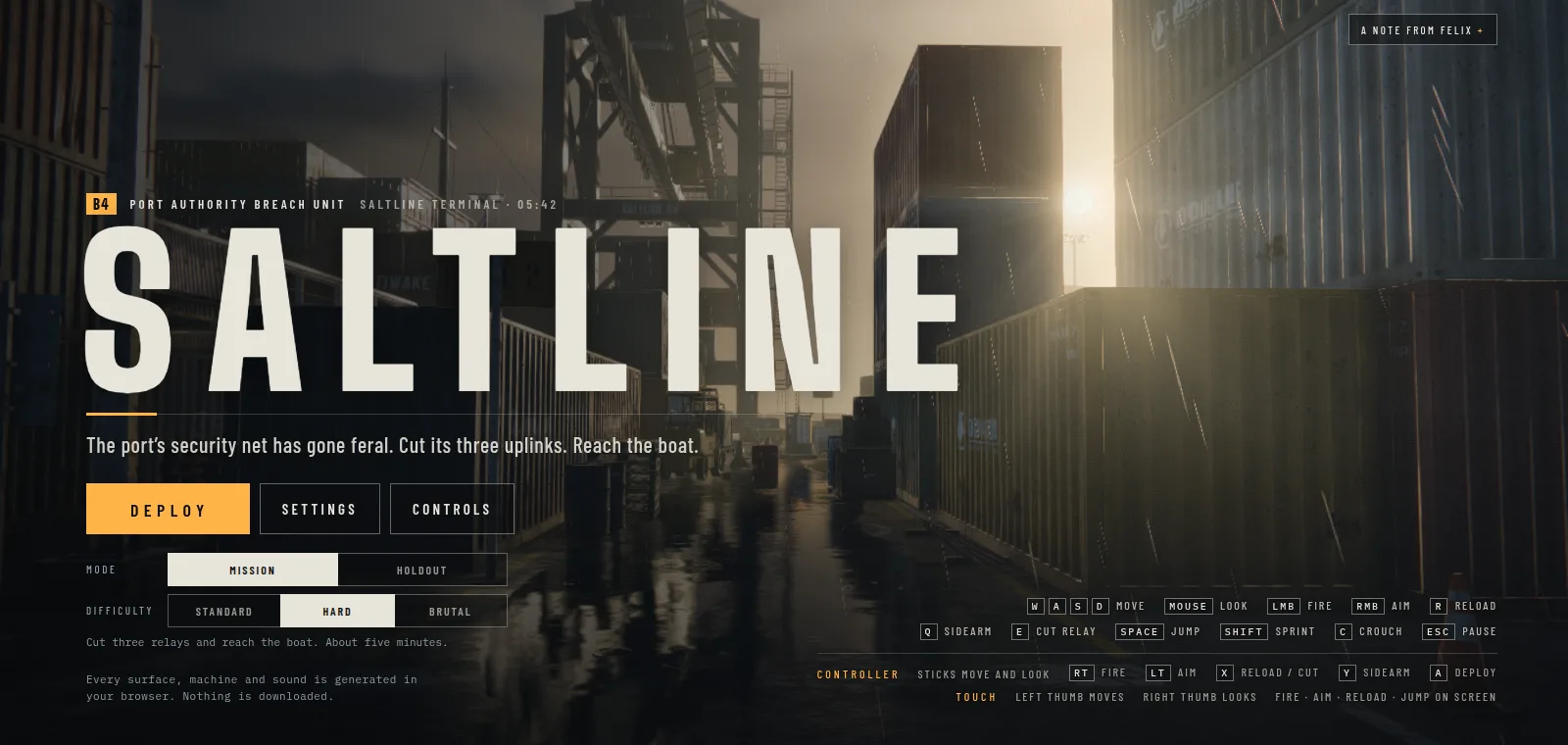
When loading finishes you get the title screen: the SALTLINE logo over the container port, a Deploybutton, Settings, Controls, and two rows of options for mode and difficulty. A panel on the right holds a note from Felix Rieseberg. You can close it, or use it to switch to the original one-shot version of the game.
Saltline walkthrough: controls
These bindings are taken from the game's own title screen.
| Action | Keyboard + mouse | Controller | Touch |
|---|---|---|---|
| Move | W A S D | Left stick | Left thumb |
| Look | Mouse | Right stick | Right thumb |
| Fire | Left click | RT | On-screen button |
| Aim | Right click | LT | On-screen button |
| Reload | R | X | On-screen button |
| Cut relay | E | X | Not listed |
| Sidearm | Q | Y | Not listed |
| Jump | Space | Not listed | On-screen button |
| Sprint | Shift | Not listed | Not listed |
| Crouch | C | Not listed | Not listed |
| Pause | Esc | Not listed | Not listed |
| Deploy (start) | Click Deploy | A | Tap Deploy |
On a controller, X does double duty: it reloads and it cuts a relay, depending on what is in front of you. Keep that in mind when you are standing next to a relay with an empty magazine.
Mission or Holdout
The Mission mode is the story run and the one most people mean when they talk about Saltline. The game describes it in one line: cut three relays and reach the boat, about five minutes. Holdoutsits next to it on the title screen and is the endless mode: waves keep coming, each bigger than the last, and your best score is saved in your browser. Play Mission first; it shows you the whole port, and you will know the layout when you come back to chase a Holdout high score.
Choosing a difficulty
- Standard: for a first look. You will spend more time admiring the rain than fighting, which is the point of a first run.
- Hard: it was preselected when we opened the game. A fair fight if you play shooters regularly.
- Brutal: for a second or third run, once you know where the relays are and can move between them without stopping to look around.
The objective: three relays and the boat
You play a member of the Port Authority Breach Unit sent into Saltline Terminal. The port's automated security net has gone feral. Its three uplink relays keep it running, so your job is to reach each relay, pressE to cut it, and once all three are down, make it to the cargo ship docked at the terminal. Getting on the boat ends the run.
Moving between relays
The port is a maze of container stacks, crane legs and narrow lanes. Long sight lines run down the main lanes, and the gaps between stacks give you cover. Move along the edges of the lanes rather than down the middle, sprint across open ground with Shift, and stop behind a container before you look around a corner. Crouching with C makes you a smaller target when you have to hold a position.
Cutting a relay safely
Cutting a relay means standing still in the open with your eyes on the relay rather than on the lane behind you. Clear the area first, reload before you start, and if you hear enemies closing in, stop and deal with them. The relay will still be there.
Gulls and Hounds
Reports from the launch name two enemy types, Gulls and Hounds, both part of the security net rather than human soldiers. Whatever comes at you, the same rules hold: fight from cover, aim down sights with the right mouse button for anything beyond close range, and switch to the sidearm with Q instead of reloading when something is already on top of you.
Reaching the boat
After the third relay goes down, head for the ship. Do not stop to fight everything on the way; sprint between cover and only shoot what blocks your path.
Saltline is slow, freezes or stutters
Saltline renders rain, reflections and lighting in WebGL, and some players reported freezes and stutter after launch. Most problems come down to the browser not getting enough of the graphics card. Try these in order:
- Close other heavy tabs, especially video and other games.
- Plug in your laptop. Many laptops throttle the GPU on battery.
- Check that hardware acceleration is on. In Chrome or Edge it is under Settings, System.
- Open Settings on the title screen and lower the options there before you deploy.
- Use a desktop browser such as Chrome, Edge or Firefox. Phones work with touch controls but newer devices handle the load better.
- If the tab stays stuck on Waiting for first light, reload the page once. If it still fails, try another browser.
Try the one-shot version
The title screen note explains that Felix spent about two extra hours improving the weapon models, sounds and some gameplay after the first version went viral. A button in that note opens the original version that Claude Fable 5.2 built with no human feedback, or you can open the one-shot version here. Finish a Mission run in the current version, then play the original for comparison. To learn how either version came about, read how Saltline was made.